
Warning
This is a design page. It was used to design and discuss the initial implementation of the change. However, the state of this document does not necessarily correspond to the current state of the implementation since we do not keep this document up to date with further changes and bug fixes.
Passwordless-GDM authentication integration
Related ticket(s):
Problem statement
Passwordless authentication is becoming increasingly popular. SSSD and FreeIPA already provide several authentication mechanisms which make use of it: Smart Cards, External Identity Providers (EIdP) and Passkeys. Unfortunately, the integration of these mechanisms into the graphical interface leaves much to be desired. Some of them may work in a degraded mode, while others can’t be used at all.
SSSD and the GUI should be better integrated to make all these authentication mechanisms effortless for the user. This would increase the overall security of the system, by providing the benefits of these authentication mechanisms, i.e. passwordless, MFA, etc.
SSSD and GDM are working together to provide a set of interfaces that can be used to enable these authentication mechanisms in Linux’s GUI. While the initial work targets SSSD-GDM integration, the objective is that these interfaces can be used by any other desktop environment.
Use cases
As a centrally managed user, I want to choose the authentication mechanism to login from the graphical interface so that I can select the one that best suits my needs.
As a centrally managed user, I want to use an external identity provider (IdP) to login from the graphical interface so that the user interface is easy to use and consistent across all authentication mechanisms in the distribution.
As a centrally managed user, I want to select the smart card identity to login from the graphical interface so that the authentication is performed with the correct credentials.
As a centrally managed user, I want to use a passkey to login from the graphical interface so that the user interface is easy to use and consistent across all authentication mechanisms in the distribution.
As a centrally managed user, I want to get notified when the passkey or smartcard authentication has been performed locally so that I am aware that the user experience might be affected.
Solution overview
The objective is to provide usable workflows for users to authenticate in the graphical interface using passwordless authentication mechanisms. To do this, we first need to design a communication protocol between SSSD and GDM.
The APIs can be implemented in two ways, either by implementing them in D-BUS, or by extending the PAM conversation to include the new authentication mechanisms. There doesn’t seem to be any advantage in using D-BUS, whereas a PAM-level API would give other desktop environments the ability to offer similar features. For this reason, the GDM PAM extension has been selected.
GDM already provides an interface in /usr/include/gdm/gdm-pam-extensions.h
that SSSD supports. Unfortunately extending this binary interface is hard, so
a JSON based protocol is used. It’s easier to extend and manage, making it
easier to adapt the different packages involved. The previous implementation
will continue to be maintained for backward compatibility.
As for the workflows, they have to provide the user with a way to interact (i.e. insert the hardware token or enter the PIN), while allowing communication with the device or the external provider. Each authentication mechanism needs its own sequence diagram definition, which will be explained later in this document.
Implementation details
Sequence diagram
The communication between SSSD and GDM is explained in the following sequence diagram.
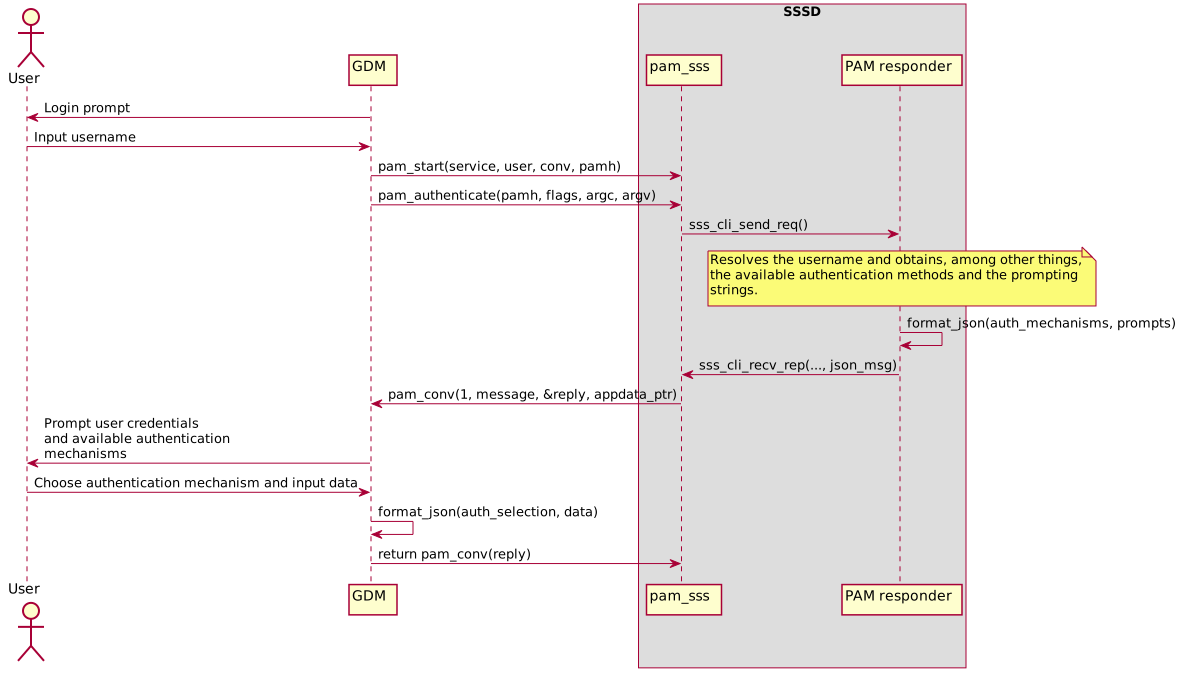
GDM prompts the user for their username.
The user initiates the login procedure by entering their username.
GDM starts the PAM conversation.
GDM starts the authentication process in SSSD.
pam_sss communicates with the PAM responder to resolve the user.
PAM responder resolves the username and obtains, among other things, the available authentication methods and the prompting strings.
PAM responder prepares the JSON message with the available authentication mechanisms, the prompts and the user credentials to be requested (check format in Data).
PAM responder returns this information to pam_sss.
pam_sss wraps the JSON message in the PAM conversation using the macros provided by GDM in
/usr/include/gdm/gdm-custom-json-pam-extension.h.GDM prompts the user for the user credentials, and at the bottom of the screen it shows the available authentication mechanisms. If the user selects another method, GDM already has all the information needed to request the user credentials for this authentication mechanism.
The authentication workflow continues, but varies depending on the selected authentication mechanism. This will be explained separately for each mechanism.
krb5_child
krb5_child is the helper binary in charge of Kerberos authentication. It
follows the general model of separating the authencation in two steps:
preauthentication and authentication. The first part opens a connection
to the KDC to receive the Kerberos pre-authentication methods available for the
given user.
Currently, krb5_child behaves differently depending if there are
pre-authentication methods which have to keep the state. Nowadays this would
be EIdP and passkey. If such a method is found it is immediately selected by
krb5_child, which keeps running and hence keeps the state while the
information is displayed to the user and they follow the necessary steps for
authentication. At this point is when the status changes to authentication
and the still running krb5_child proceeds with the authentication itself.
If there are no stateful authentication methods found (password, 2-factor
authentication, Smartcard/pkinit) a list of available methods are returned by
krb5_child at the end of preauthentication and krb5_child exits.
The PAM responder selects an authentication method based on some heuristics,
e.g. if pkinit is available and a Smartcard is present pkinit is selected. Now
the suitable prompt is displayed to the user and after they entered the
required credentials the backend starts a new krb5_child for
authentication. After the KDC has returned the available Kerberos
pre-authentication method krb5_child uses the pre-authentication methods
matching the given credentials to finish the authentication.
This was a valid solution when SSSD was the one deciding which authentication
method to use during the process. This is no longer the case, since with this
new proposal it is the user who decides the mechanism to be used, so the
current krb5_child design must be extended.
During the preauthentication phase, krb5_child opens a connection to
the KDC to receive the Kerberos pre-authentication methods available for the
given user and all necessary information (e.g. login URLs, codes, prompts).
At this point krb5_child is kept alive for all methods as it must wait for
the user response. The information is displayed to the user and once they enter
the credentials, pam_sss switches to the authentication phase and PAM
responder serializes the credentials in the sss_auth_token structure.
The still running krb5_child gets the authentication type and the
credentials, and proceeds with the authentication itself.
Data
In addition, the messages exchanged follow the JSON standard. SSSD provides the available authentication mechanisms in the following message:
{
  "authSelection": {
    "mechanisms": {
      "$mech1": {
        "name": "$name1",
        "role": "$role1",
        "msg1": "$msg1"
      },
      "$mech2": {
        "name": "$name2",
        "role": "$role2",
        "msg1": "$msg2",
        "msg2": "$msg3"
      }
    },
    "priority": [
      "$role2",
      "$role1"
    ]
  }
}
The field meaning is as follows:
name: the mechanism name that will be shown in the login screen.
role: the authentication mechanism. It can be password, EIdP, smartcard or passkey.
GDM answers with the result for the previous JSON message processing:
{
  "authSelection": {
    "status": "$status",
    "mech": {
      "data1": "$data1",
      "data2": "$data2"
    }
  }
}
For clarification, there are two different types of user interaction messages: prompt and instruction. The first one asks the user to enter something on the screen, e.g. the PIN. The second type prompts the user to follow instructions, e.g. to enter the PIN into the reader.
The JSON request and reply messages for different authentication mechanisms are defined in the next sections.
Password
SSSD provides the available authentication mechanisms:
{
  "authSelection": {
    "mechanisms": {
      "password": {
        "name": "Password",
        "role": "password",
        "prompt": "Password:"
      }
    },
    "priority": [
      "password"
    ]
  }
}
GDM replies with the selection:
{
  "authSelection": {
    "status": "Ok",
    "password": {
      "password": "ThePassword"
    }
  }
}
EIdP
SSSD provides the available authentication mechanisms:
{
  "authSelection": {
    "mechanisms": {
      "eidp": {
        "name": "Web Login",
        "role": "eidp",
        "initPrompt": "Login",
        "linkPrompt": "Log in online with another device",
        "uri": "https://short.url.com/1234",
        "code": "1234",
        "timeout": 300
      }
    },
    "priority": [
      "eidp"
    ]
  }
}
GDM replies with the selection:
{
  "authSelection": {
    "status": "Ok",
    "eidp": {}
  }
}
Smart card
SSSD provides the available authentication mechanisms:
{
  "authSelection": {
    "mechanisms": {
      "smartcard": {
        "name": "Smartcard",
        "role": "smartcard",
        "certificates": [
          {
            "tokenName": "sc1",
            "certInstruction": "Certificate for PIV Authentication\nCN=sc1,O=GDM.TEST",
            "pinPrompt": "PIN",
            "moduleName": "/usr/lib64/pkcs11/opensc-pkcs11.so",
            "keyId": "01",
            "label": "Certificate for PIV Authentication"
          },
          {
            "tokenName": "sc2",
            "certInstruction": "Certificate for PIV Authentication\nCN=sc2,O=GDM.TEST",
            "pinInstruction": "Enter PIN in reader",
            "moduleName": "/usr/lib64/pkcs11/opensc-pkcs11.so",
            "keyId": "02",
            "label": "Certificate for PIV Authentication"
          }
        ]
      }
    },
    "priority": [
      "smartcard"
    ]
  }
}
Note: name field might have multiple lines.
GDM replies with the selection:
{
  "authSelection": {
    "status": "Ok",
    "smartcard": {
      "pin": "ThePIN",
      "tokenName": "sc1",
      "moduleName": "/usr/lib64/pkcs11/opensc-pkcs11.so",
      "keyId": "01",
      "label": "Certificate for PIV Authentication"
    }
  }
}
Passkey
SSSD provides the available authentication mechanisms:
{
  "authSelection": {
    "mechanisms": {
      "passkey": {
        "name": "Passkey",
        "role": "passkey",
        "initInstruction": "Insert security key",
        "keyConnected": true,
        "pinRequest": true,
        "pinAttempts": 8,
        "pinPrompt": "Security key PIN",
        "touchInstruction": "Touch security key",
        "kerberos": true,
        "cryptoChallenge": "6uDMvRKj3W5xJV3HaQjZrtXMNmUUAjRGklFG2MIhN5s="
      }
    },
    "priority": [
      "passkey"
    ]
  }
}
GDM replies with the selection:
{
  "authSelection": {
    "status": "Ok",
    "passkey": {
      "pin": "ThePIN",
      "kerberos": true,
      "cryptoChallenge": "6uDMvRKj3W5xJV3HaQjZrtXMNmUUAjRGklFG2MIhN5s="
    }
  }
}
All authentication mechanisms
SSSD provides the available authentication mechanisms:
{
  "authSelection": {
    "mechanisms": {
      "password": {
        "name": "Password",
        "role": "password",
        "prompt": "Password:"
      },
      "eidp": {
        "name": "Web Login",
        "role": "eidp",
        "initPrompt": "Login",
        "linkPrompt": "Login online with another device",
        "uri": "https://short.url.com/tmp",
        "code": "1234",
        "timeout": 300
      },
      "smartcard": {
        "name": "Smartcard",
        "role": "smartcard",
        "certificates": [
          {
            "tokenName": "sc1",
            "certInstruction": "Certificate for PIV Authentication\nCN=sc1,O=GDM.TEST",
            "pinPrompt": "PIN",
            "moduleName": "/usr/lib64/pkcs11/opensc-pkcs11.so",
            "keyId": "01",
            "label": "Certificate for PIV Authentication"
          }
        ]
      },
      "passkey": {
        "name": "Passkey",
        "role": "passkey",
        "initInstruction": "Insert security key",
        "keyConnected": true,
        "pinRequest": true,
        "pinAttempts": 8,
        "pinPrompt": "Security key PIN",
        "touchInstruction": "Touch security key",
        "kerberos": true,
        "cryptoChallenge": "6uDMvRKj3W5xJV3HaQjZrtXMNmUUAjRGklFG2MIhN5s="
      }
    },
    "priority": [
      "smartcard",
      "passkey",
      "eidp",
      "password"
    ]
  }
}
GDM replies with the selection, as explained in the preceding sections.
Authentication mechanisms priority
The priority for the authentication mechanisms set in the JSON message is a hardcoded value. This priority is only used the first time the user tries to login as there are no saved methods. Once the user authenticates with a method GDM will remember it and the next time the same user tries to login this method will be provided. The priority is as follows:
Smartcard
Passkey
EIdP
Password
Configuration options
PAM responder options
PAM responder provides the new pam_json_services option to enable the
aforementioned authentication method selection mechanism. This is a list of all
PAM service files allowed to use it. Application maintainers can use it to let
SSSD know they support the json protocol, and that SSSD should provide the
available authentication methods using it.
authselect options
To enable the passwordless-GDM authentication integration, the system’s PAM configuration must support the new authentication mechanism selection protocol. The authselect tool provides a dedicated feature for this purpose.
Use the with-switchable-auth feature to configure the PAM stack to support
multiple authentication mechanisms in GDM:
authselect enable-feature with-switchable-auth
Version Requirements
This feature requires minimum versions of the following components:
SSSD: 2.12.0
authselect: 1.7.0
GDM: 50.0
Authors
Iker Pedrosa <ipedrosa@redhat.com>
Ray Strode <halfline@redhat.com>
Joan Torres <joantolo@redhat.com>